

Managed WordPress That Scales from a Single Stack to a Multi-Region Cluster
Run WordPress on a managed platform with autoscaling, optional high-availability clustering, and support from in-house engineers. Pay only for the capacity you use.
Each hour charges for whichever resource — RAM or CPU — your app used more of, not both combined. Set reserved and maximum limits to cap spending.
Vertical scaling adds cloudlets (128 MiB RAM + 400 MHz) as traffic grows. Cluster packages add web nodes across three load-based presets.
The platform handles infrastructure, SSL renewal, and 14 daily backups. You manage WordPress, plugins, and themes.
Talk to the people who built the platform, not a ticket queue.
Choose your WordPress setup on one managed platform
- Pick a single-stack (all services in one container), HA cluster, or multi-region deployment from one platform and one control panel
- Autoscaling adds and releases capacity automatically, so you pay per hour for the cloudlets each node actually uses, not for fixed plan tiers
- In-house engineers manage the infrastructure; you manage WordPress, plugins, and themes
- Deploy from Git, upload an archive, or install from the marketplace in one click — the platform handles SSL renewal, WAF (Web Application Firewall) protection, and 14 daily backups for you
Standalone WordPress for single-stack simplicity
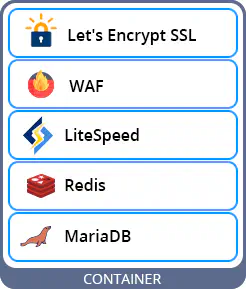
A dedicated WordPress stack with LiteSpeed, MariaDB, Redis, and WordPress in one container. It scales vertically within your cloudlet limits. WordPress Multisite is supported (one container per network). Best fit for blogs, brochure sites, agency portfolios, and moderate WooCommerce traffic.
Vertical Autoscaling
WooCommerce & Multisite
Redis Object Cache
-
Let’s Encrypt SSL — Automatic issuance and zero-downtime renewal on paid accounts.
-
LiteSpeed Web Server — HTTP/3, LSCache, and .htaccess compatibility. Add-on
-
WAF + Brute-Force Protection — LiteSpeed WAF with WordPress-specific filtering and brute-force login protection.
-
14 Daily Backups — Included free, with restore points for each of the last 14 days.
-
MariaDB Database — Dedicated MariaDB instance with automatic maintenance and tuning.
-
SFTP & SSH Access — Direct file access via SFTP and SSH for deployments and debugging.
Launch isolated, auto-scaling WordPress
Start with a single stack today, then move to cluster or multi-region later without changing platforms.
WordPress Cluster with horizontally scaled web nodes and synchronized databases
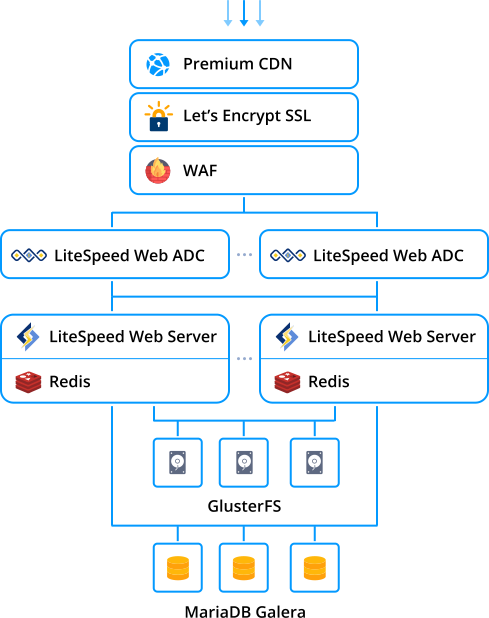
WordPress Cluster adds a load balancer, multiple web nodes, Galera database replication (every write is confirmed on all database nodes before it completes), and shared storage. Horizontal autoscaling covers traffic spikes, while Galera keeps the database consistent across nodes.
Load Balancer
Horizontal Scaling
Galera DB Replication
-
GlusterFS Shared Storage — GlusterFS replicated volumes for multi-node file access. Media uploads available across all web nodes.
-
Automatic Failover — If a node fails, remaining nodes absorb traffic automatically.
-
14 Daily Backups — Included free, with restore points for each of the last 14 days.
Launch a WordPress cluster
Best for WooCommerce and content sites that need multi-node web and database resilience from day one.
Best fit for Cluster
- WooCommerce stores with traffic spikes
- Agency-managed WordPress sites needing HA
- Publishers and content platforms at scale
- Teams that want managed updates and autoscaling
Consider instead
- Global audience? See Multi-Region below for geographic load balancing across data centers.
- Smaller site? Standalone runs in a single container at lower cost.
- Need full OS control? Cloud VPS gives you root access and fixed resources.
- Non-WordPress apps? App Hosting supports Java, Node.js, PHP, Python, Ruby, and more.
Geographic resilience across data centers
Run WordPress across multiple data centers with cross-region database synchronization. Traffic routes to the nearest region and reroutes automatically if a region fails. You can choose between standalone multi-region and clustered multi-region.
Standalone Multi-Region, from ~$12/mo
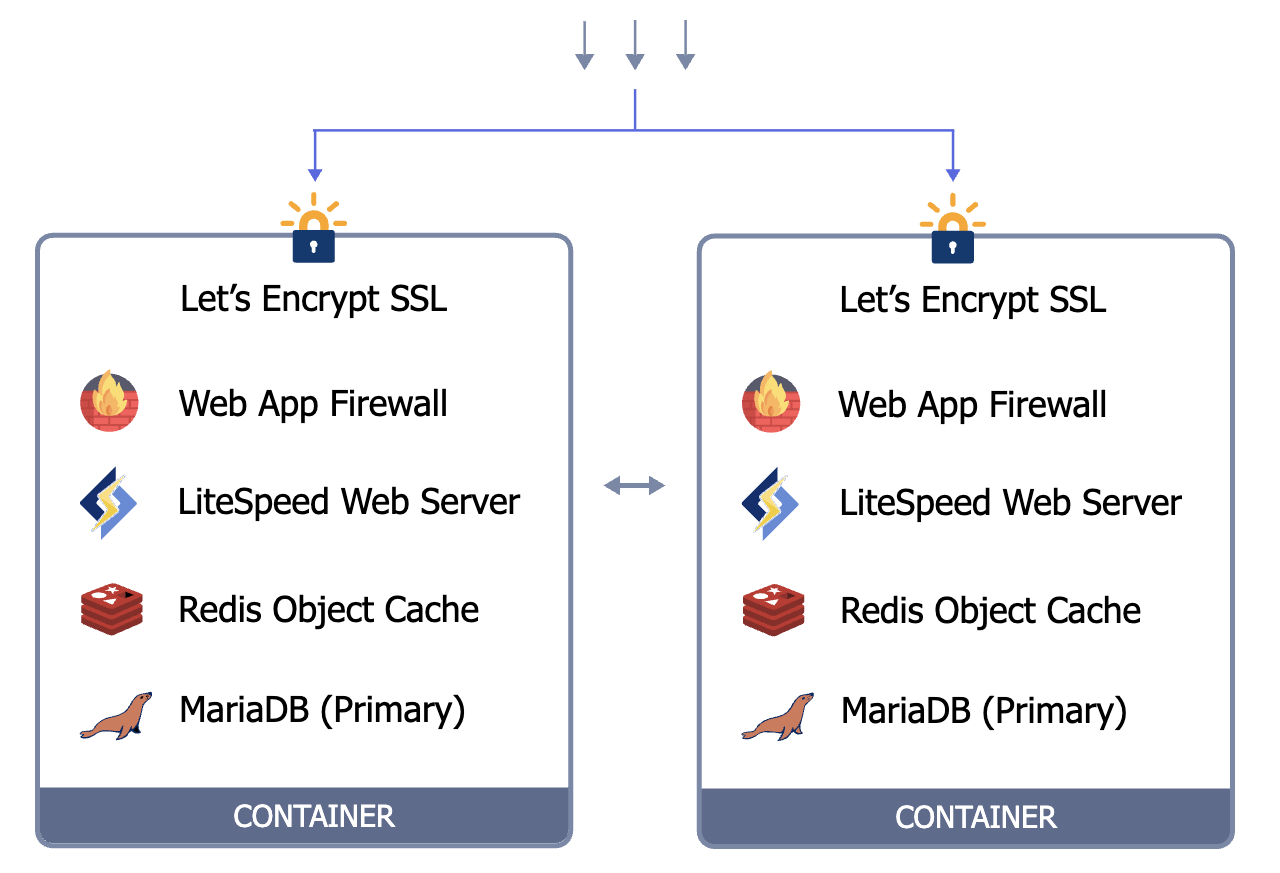
Each data center gets its own self-contained WordPress stack with web server, database, cache, and firewall. Regions sync automatically. There is no shared storage layer or clustered database, which keeps the baseline cost lower.
Web Server per Region
Async DB Replication
DNS-Based Routing
-
Let’s Encrypt SSL — Automatic issuance and renewal in each region.
-
14 Daily Backups — Independent backup schedule per region.
-
WAF + Brute-Force Protection — LiteSpeed WAF with WordPress-specific filtering per region.
Deploy WordPress across regions
Use regional replicas and health-checked failover when uptime matters more than single-site simplicity.
Clustered Multi-Region, from ~$44/mo
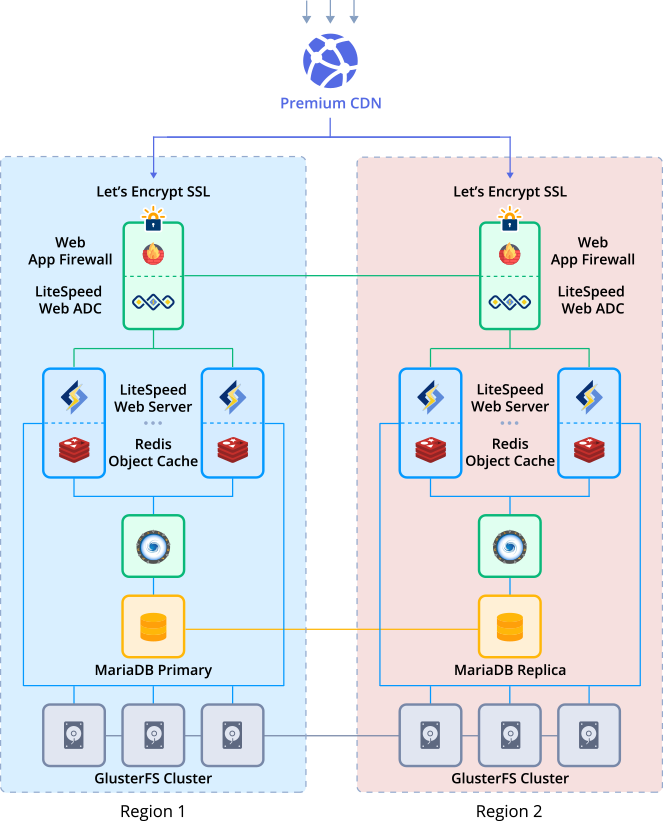
Each region runs a full HA cluster with LiteSpeed ADC load balancer, MariaDB Galera, GlusterFS shared storage, Redis, and WAF already configured at deploy time. Horizontal scaling adds nodes automatically.
Full HA per Region
Galera + Geo-Replication
GlusterFS Geo-Replication
-
ProxySQL Read-Write Splitting — Automatic query routing across Galera nodes within each region.
-
LiteSpeed ADC — Layer 7 load balancer with HTTP/3, sticky sessions, and health checks per region.
-
Automatic Failover — If a node or region fails, traffic reroutes to healthy infrastructure.
Deploy WordPress across regions
Use full HA in each region when you need both multi-node resilience and cross-region recovery.
What to expect
- Cross-region replication is asynchronous, so writes typically appear in the other region within seconds
- Actual latency improvement depends on visitor geography and caching configuration
- Clustered uses synchronous Galera replication within each region; standalone uses asynchronous primary-replica replication (writes typically sync within seconds) between regions
- Write-heavy sites (high-volume stores, membership platforms with frequent updates) should test in a trial environment to confirm cross-region replication lag stays under your tolerance
When not to use multi-region
- Audience concentrated in a single region: WordPress Cluster or Standalone provides the same vertical and horizontal scaling at lower cost
- Multi-region is designed for sites whose visitors span multiple countries or continents
See Togglebox data center locations and geographic coverage.
Scaling profiles
Each cluster ships with a scaling profile that controls when nodes are added or removed. Vertical scaling adjusts cloudlets on existing nodes, and horizontal scaling adds or removes entire application servers. Web nodes are stateless (no local data kept between requests), so new nodes start serving traffic immediately without a data sync step.
Applies to Cluster and Multi-Region Cluster tiers. Profiles are adjustable. Chat with an engineer for a recommendation based on your traffic patterns.
Test changes on staging before you push live
Clone your production environment in one click. Test plugin updates, theme changes, and configuration tweaks on the same setup before you push them live.
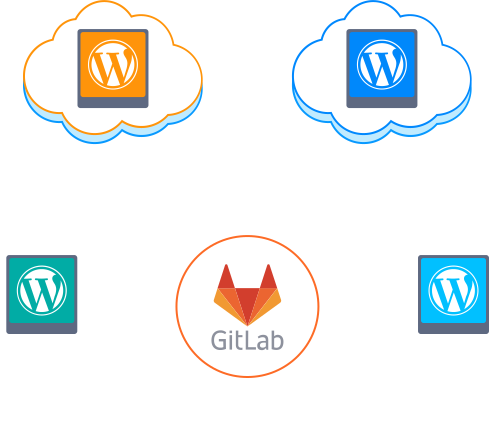
Staging Mirror
Role-Based Access
Built-In Sync
-
Parallel Staging. Run parallel staging environments so one team can test a plugin upgrade while QA reviews a theme change in another.
-
Git & CI/CD Deploy. Push from Git or trigger deploys from your CI pipeline.
-
One-Click Rollback. Restore any of the last 14 daily backups in one click.
Test changes safely before going live
Cluster-tier feature. Clone the live environment, test plugin or theme changes safely, then push approved updates with less risk.
Live environment monitor
Reserved & Max Limits
Real-Time Monitoring
Pay-Per-Use Billing
Trusted by businesses that rely on real support
Common Questions
How does pricing work?
WordPress Hosting is billed hourly from a prepaid balance. You set a reserved baseline and maximum cloudlets. Autoscaling stays within those limits.
How is this different from VPS hosting?
WordPress Hosting runs on App Hosting architecture and guardrails, so you don't assemble and operate every piece. If you need full OS control, compare PaaS vs VPS.
What is a cloudlet?
A cloudlet is one unit of compute: 128 MiB RAM + 400 MHz CPU. You set baseline and burst scaling in cloudlets.
What is a WordPress cluster (and do I need one)?
A WordPress cluster uses a load balancer and multiple web nodes (plus caching and shared storage) to improve availability and handle spikes. If you need redundancy and scaling headroom, it's a better fit than a single server.
What load balancer options do you support?
LiteSpeed ADC or NGINX load balancer, depending on your stack selection.
What web server options do you support?
LiteSpeed Web Server or NGINX PHP servers, with preconfigured autoscaling triggers.
What database options do you support for WordPress?
Highly available MariaDB Galera Cluster or primary-secondary replication (choose based on your workload and requirements).
Do you include Redis caching and shared storage?
Redis caching and shared storage come with the WordPress cluster template.
How does autoscaling work for WordPress (vertical vs horizontal)?
WordPress clusters scale vertically (resources per node) and horizontally (add or remove web nodes) within limits you control. The exact behavior depends on your stack and application design.
Can I control scaling limits so costs stay predictable?
Set a reserved baseline and maximum cloudlets. For estimates, use the pricing calculator. Autoscaling & cost controls has the details.
What WAF options are available for WordPress?
LiteSpeed WAF if LiteSpeed is selected. Otherwise, ModSecurity with NGINX.
Do you include SSL certificates?
Paid accounts include Let's Encrypt SSL, and it renews automatically. No manual certificate management required.
Do you support WordPress multisite?
WordPress Multisite Networking is fully supported.
How do you handle media uploads in a multi-node WordPress setup?
Shared storage is included so media assets are available across web nodes.
How is WordPress on App Hosting different from WordPress on a VPS?
This page covers a preconfigured WordPress cluster layout on App Hosting. If you want OS-level control and a single VM you manage end-to-end, see Cloud VPS and PaaS vs VPS.
Who should use multi-region WordPress hosting?
Multi-region WordPress hosting is best for teams that need strong global performance and resilience during spikes and regional outages.
Can I start with a trial first?
Start with a WordPress trial, then expand to multi-region as traffic and uptime needs grow.
Do you help with WordPress migration?
We can help plan migration sequencing, cutover timing, and rollback safety. Reach out to map your migration path.
How do I choose the right data center region?
Review available regions and facility details on Datacenters. Choose the region closest to your users or compliant with your data residency requirements.
No matching questions found.
Ready to deploy WordPress?
Pick standalone, cluster, or multi-region from the same control panel, then deploy in one click.
No credit card required • Cancel anytime • Managed support included