

Kubernetes Clusters with Marketplace Deploy from the App Hosting Dashboard
Deploy a production Kubernetes cluster with container networking, ingress routing, Helm, and automatic storage allocation already pre-configured. Pods scale via HPA (Horizontal Pod Autoscaler), and the platform adds worker nodes automatically when existing nodes fill up. Pay only for the cloudlets you use.
CNI, ingress, Helm, CoreDNS, storage provisioners, and monitoring ship ready to use.
Isolate workloads with namespaces, scope access with RBAC service accounts, and run multi-service deployments.
HPA adds pod replicas on CPU/memory thresholds; the platform adds worker nodes when capacity fills.
Run HA control planes with API load balancers for production-grade cluster resilience.
Get a production Kubernetes cluster without the integration sprint
Platform teams
Deploy from a preconfigured cluster layout
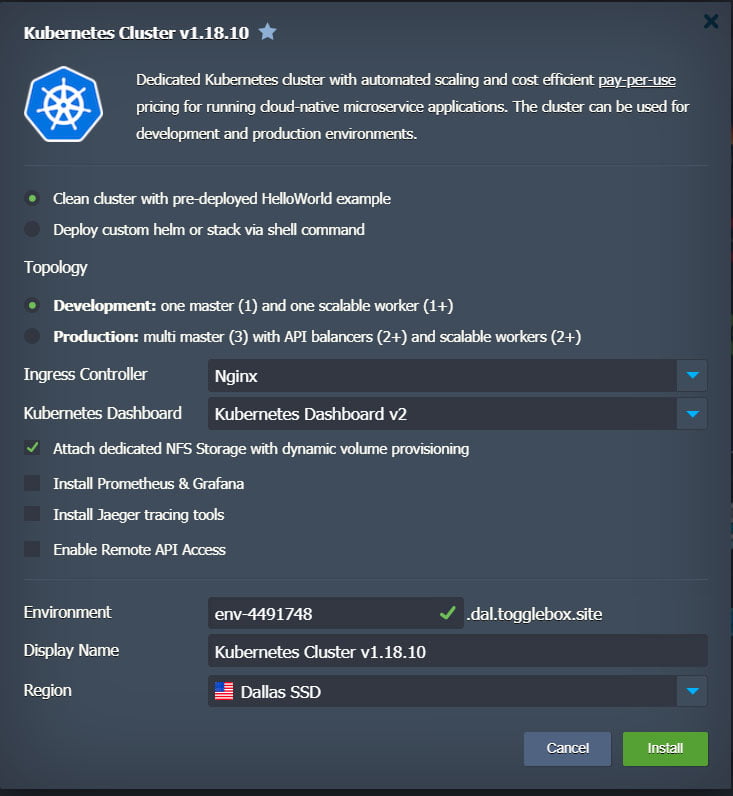
Choose a Development or Production preset at install. Production ships multi-master control planes with API load balancers; Development gives a single control plane for staging and test.
App teams
Ship with Helm or kubectl apply
Push chart-based releases through Helm or deploy raw manifests with kubectl apply -f. Ingress, TLS, and DNS resolve without filing infrastructure tickets.
Ops-light teams
Skip the integration sprint
CNI, ingress controllers, CoreDNS, automatic storage allocation, and monitoring are all installed and connected from the start.
Model pricing with the calculator. For baseline vs burst pricing, see Autoscaling & Cost Controls.
Ship your first pod without configuring the plumbing
Kubernetes needs networking, DNS, storage, ingress, and TLS before your first pod can run. The Marketplace offers Development (single control plane) and Production (multi-master with API load balancers) presets, and both come pre-configured:
Networking & ingress
Helm, kubectl & storage
kubectl apply -f. NFS-backed dynamic storage allocation included, with GlusterFS available for distributed workloads.Observability & management
Stop paying for idle capacity
Billing based on actual consumption, not server size
Usage-based billing
Burst without overpaying
Usage visibility
Let the platform and Kubernetes scale in tandem
The platform scales worker nodes automatically: cloudlets add RAM/CPU vertically within each node; the platform adds new worker nodes horizontally when existing nodes fill. Kubernetes HPA (Horizontal Pod Autoscaler) and VPA (Vertical Pod Autoscaler) handle pod-level scaling independently. You set limits at both layers and pay only for cloudlets consumed. Monitor both on the Observability dashboard.
Protect your cluster and upgrade without downtime
Velero backup
Disaster recovery
Zero-downtime upgrades
Velero runs as an add-on inside the cluster. Install it from the Marketplace during setup or later.
Deploy from your terminal or CI pipeline
Remote kubectl & Helm
kubectl apply -f for manifest deploys, push Helm charts, or connect CI/CD runners without depending on the dashboard.GitLab CI/CD
For cluster-based pricing, try the calculator or chat with an engineer about your architecture.
Common Questions
What is included with Togglebox managed Kubernetes hosting?
It includes preconfigured Kubernetes components (ingress, DNS, storage provisioning, Helm, dashboard), plus optional multi-master and add-ons for monitoring and tracing.
Which ingress controllers can I choose?
You can use HAProxy, Nginx, or Traefik ingress controllers based on your deployment needs.
Do you include Helm?
Helm handles one-click deployment of popular applications.
What DNS is included?
CoreDNS provides in-cluster DNS resolution. Pods and services resolve each other by name automatically, so you don't manage DNS entries manually within the cluster. External DNS for public endpoints is handled separately through your domain records.
What storage options are available for persistent volumes?
Persistent volume provisioning is supported. Optional storage choices include an NFS provisioner and a GlusterFS storage cluster.
What CNI/network plugin is used?
Weave CNI is used for internal networking.
Do you support multi-master Kubernetes clusters?
Multi-master with API load balancers ships as an optional configuration.
Do you automate Kubernetes installation and updates?
The platform automates Kubernetes installation, configuration, and updates, and provides additional cluster components.
How does scaling work (vertical scaling vs adding workers)?
Vertical scaling is automated based on load. Worker scaling can be automated or manual, depending on your setup. For baseline vs burst capacity, see Autoscaling & cost controls.
What monitoring and tracing options are available?
Metrics server is available, with optional Prometheus/Grafana for monitoring and Jaeger for tracing. See Observability for visibility patterns.
Should I use Kubernetes or App Hosting architecture presets?
Choose Kubernetes when you need orchestration primitives and a multi-service platform. Choose App Hosting presets when you want simpler PaaS clustering without Kubernetes overhead. Compare both in the pricing calculator.
Can I manage cluster spend with cloudlet limits?
Set baseline and max limits per node group, then tune worker scaling to stay within budget guardrails. Pair those limits with usage alerts so cost changes are visible early.
No matching questions found.
Start your 14-day free trial
Deploy in minutes with managed autoscaling and clustering built in.
No credit card required.