

Java App Hosting That Scales JVM Workloads and Clusters for Redundancy
Run Spring Boot, Tomcat, WildFly, Payara, GlassFish, or TomEE. Autoscaling absorbs JVM demand spikes within limits you set. Add clustering and a load balancer so your app stays up when a node fails.
Tomcat, Spring Boot, WildFly, GlassFish, Payara, TomEE, and Jetty ready to deploy.
Upload artifacts or build from Git with Maven or Gradle pipelines.
JVM resources scale automatically. Set a reserved baseline and burst cap — pay only for what you use.
Platform handles JDK patches and server upgrades. Your team ships features.
Pick your Java server and deploy in minutes
For clustered web apps, horizontal Spring APIs, teams leaving self-managed servers, and agencies running isolated client environments.
Supports Corretto · Temurin · OpenJDK · Zulu
Starting at $0.008/hr (~$5.69/mo per node)
Set reserved cloudlets and a scaling limit. Cloudlets (each 128 MiB RAM + 400 MHz CPU) bill at the reserved rate when committed, and at the dynamic rate only when used.
Operate a clustered Java stack from one screen.
Topology view shows load balancers, app nodes, databases, storage, and an active terminal for hands-on runtime work.
Stop managing infrastructure and ship Java faster
- Java web apps on Tomcat, TomEE, or WildFly that need load-balanced clusters without manual node wiring
- Spring Boot APIs that scale horizontally behind a load balancer and shrink back when traffic drops
- Teams moving legacy Java off self-managed servers so they can stop doing manual patching and 2 a.m. restart drills
- Agencies running multiple client apps with repeatable deploy workflows across isolated environments
- Security-sensitive workloads in isolated containers on dedicated hardware with per-environment access controls
Push code or drop an artifact and go live
Push to deploy with Maven or Gradle
Upload WAR, JAR, EAR, or ZIP
Script every step
Deploy your first Java app in minutes
Connect a Git repo, upload a WAR, or wire it into your pipeline. Your first 14 days are free.
IDE plugins for IntelliJ IDEA, Eclipse, Maven, and NetBeans. Full guide: Automation & CI/CD.
Keep users logged in across clustered nodes
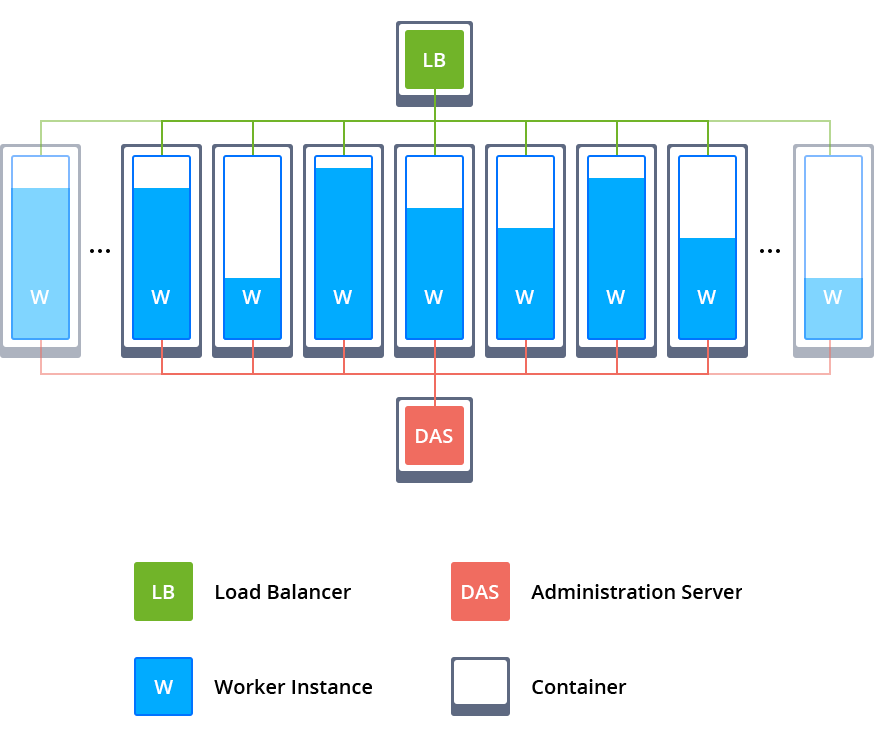
Place a load balancer in front of your Java app nodes. Each tier scales independently.
For HA databases, see Database Clusters. Run background workers as a separate node group to keep web traffic isolated.
Automatic clustering by server
Tomcat and TomEE support session replication with preconfigured load balancing. GlassFish, Payara, and WildFly support automatic node discovery, so when you scale out the platform registers new nodes with the existing cluster for you. Chat with an engineer if you want help picking the right clustering pattern.
Coordinate rolling maintenance behind a live Java cluster.
Sequential restart settings show how to restart dependent database nodes with delay instead of dropping the whole tier at once.
Run Quarkus, Jakarta EE, or Jetty on the same platform
Quarkus and Micronaut
Jakarta EE on WildFly or Payara
Jetty and TomEE
All servers support four JDK distributions (Corretto, Temurin, OpenJDK, Zulu).
Absorb traffic spikes without manual scaling
Set thresholds on five resource metrics. When load stays above or below your limits long enough to matter, the platform adds or removes nodes automatically.
CPU, RAM, Network, Disk I/O, IOPS
Stateless or stateful scaling
Domain swapping for blue-green deploys
Estimate cost at your traffic level
Configure cloudlets, scaling limits, and node count. See projected spend before you commit.
Common Questions
What Java application servers can I use?
We support Tomcat, TomEE, WildFly, Payara, GlassFish, and Jetty. Choose the server that matches your framework and deployment model. See App Hosting for a platform overview.
Can I deploy WAR, JAR, and EAR files?
Deploy common Java artifacts (WAR/JAR/EAR), usually produced by your CI build. If you prefer repo-driven builds, use the Git/Maven workflow.
Can I deploy directly from Git/SVN using a Maven build node?
Deploy from a Git/SVN workflow with a Maven build node for repo-driven deployments. Automation & CI/CD has more patterns.
What is a recommended setup for a production Java web app?
A common baseline is Traffic → Load Balancer → multiple app nodes → database. Start with a proven pattern in the Pricing Calculator.
How do sessions work in a Java cluster (sticky sessions vs replication)?
Sticky sessions keep a user on one node. Replication can share session state across nodes. For clean horizontal scaling, prefer external session or state storage when possible.
Do you support Tomcat/TomEE session replication?
Tomcat/TomEE session replication is available on multi-node setups. If you are not sure what fits, chat with an engineer.
What does "Auto-Clustering" mean for stacks like WildFly or Payara?
Auto-clustering refers to platform-assisted options that help interconnect application servers with preconfigured clustering and load-balancing settings, depending on stack and layout.
How should I set baseline/max limits for JVM memory so I don't get surprise costs?
Set a baseline for steady-state needs, a max cap for spikes, and leave headroom for non-heap memory. See Autoscaling & cost controls for how limits work.
When should I run Java on Kubernetes instead of Java on App Hosting?
Choose Kubernetes when you need deeper orchestration control, multi-service deployments, or custom platform integrations. See Kubernetes Hosting.
Can you help migrate an existing Java application?
We can help map your Java app to the platform -- application server selection, JDK version, clustering, and cutover plan. Portability & Migration has the process, or start a trial and talk to an engineer.
Which JDK distributions are available?
Choose from Amazon Corretto, Eclipse Temurin, Oracle OpenJDK, or Zulu Community. Select the JDK when creating an environment or change it later without rebuilding.
Can App Hosting scale Java nodes automatically based on load?
Set auto-scaling triggers on CPU, RAM, Network, Disk I/O, or Disk IOPS with percentage thresholds. Nodes are added or removed automatically when load exceeds your limits for a defined period.
How do custom domains work, and can I do zero-downtime deployments?
Bind a custom domain via CNAME (shared load balancer) or DNS A record (public IP). For zero-downtime upgrades, use domain swapping to redirect traffic between environments instantly, similar to blue-green deployment.
Can I run custom Java agents, and is there built-in JVM optimization?
Attach custom Java agents (APM tools, profilers) that launch at JVM startup. The platform also runs a built-in GC optimization agent on all Java stacks to reduce memory usage and release unused RAM.
Can I run pre- and post-deploy tasks for Java releases?
Use deployment hooks to run smoke checks, schema migrations, or warmup tasks as part of your release flow.
No matching questions found.
Start your 14-day free trial
Deploy in minutes with managed autoscaling and clustering built in.
No credit card required.